
Microsoft Copilot has made artificial intelligence more accessible to businesses by helping employees write content, summarize meetings, analyze information, and complete everyday tasks. But as enterprises move beyond individual productivity, a bigger question emerges: Can Microsoft Copilot support complex business operations, or do organizations need custom AI agents?
The answer depends on what your business expects AI to accomplish. Microsoft Copilot is designed to assist users within supported applications and workflows. Custom AI agents, by contrast, can be built around specific business processes, connected enterprise systems, and operational requirements.
Businesses looking to extend AI beyond standard assistance can explore an AI copilot development service to build customized copilots that understand business needs, connect with enterprise systems, and support specific workflows.
For senior leaders evaluating enterprise AI investments, understanding the difference between Microsoft Copilot vs custom AI agents is essential. It helps determine where ready-made AI capabilities are sufficient and where purpose-built solutions can deliver greater operational value.
What Is Microsoft Copilot?
Microsoft Copilot is Microsoft’s family of AI-powered assistants and experiences designed to help users complete tasks across supported Microsoft products and services. Depending on the Copilot offering, users can interact with information, generate content, summarize conversations, analyze data, and receive contextual assistance.
For organizations already using Microsoft technologies, Copilot can make AI adoption more accessible without requiring every employee to learn how to work with standalone AI tools.
Key Capabilities of Microsoft Copilot
Microsoft Copilot can support several common enterprise activities:
Document assistance: Draft, summarize, and refine business documents.
Email productivity: Help compose, summarize, and respond to emails.
Meeting assistance: Summarize discussions and identify action items in supported experiences.
Data analysis: Help users interpret information and generate insights.
Enterprise information retrieval: Find relevant organizational information based on available permissions and connected services.
Workflow support: Assist with certain tasks through supported integrations and extensions.
These capabilities make Copilot useful for knowledge workers, managers, and teams looking to improve everyday productivity.
However, its capabilities depend on the specific Copilot product, licensing, configuration, available connectors, and organizational permissions.
What Are Custom AI Agents?
Custom AI agents are purpose-built AI systems designed to perform specific tasks and support business workflows. They can interpret instructions, retrieve relevant information, use connected tools, and execute defined actions within approved boundaries.
Unlike a general-purpose assistant, a custom AI agent can be designed around an organization’s business rules, operational requirements, existing applications, and performance objectives.
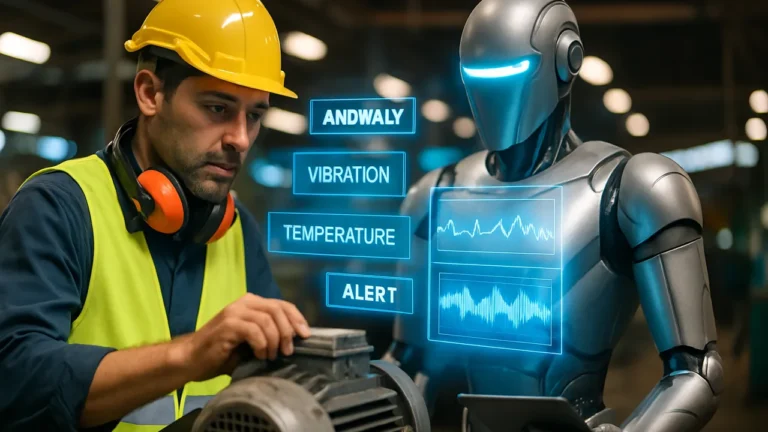
For example, a manufacturing company could deploy a custom maintenance agent that reviews equipment alerts, retrieves maintenance history, identifies potential issues, and recommends the next action to an authorized technician.
How Custom AI Agents Work
A custom AI agent typically combines several components:
AI models: Large language models interpret requests and support reasoning.
Business knowledge: Enterprise documents, databases, and knowledge sources provide relevant context.
System integrations: APIs and connectors allow agents to interact with authorized applications.
Tools and workflows: Defined functions enable agents to retrieve information and perform specific actions.
Governance controls: Permissions, validation, audit trails, and human approvals help manage execution.
Monitoring and evaluation: Performance, accuracy, reliability, and operational outcomes are measured over time.
These components allow enterprises to build AI agents for specialized activities such as customer service, procurement, sales operations, finance, and manufacturing.
Common Enterprise Applications
Custom AI agents can support workflows such as:
Qualifying leads and prioritizing sales opportunities.
Processing invoices and checking financial documents.
Retrieving product information and checking parts compatibility.
Analyzing supplier quotations and procurement requests.
Supporting customer service and troubleshooting.
Monitoring production conditions and maintenance requirements.
The key advantage is flexibility: organizations can define what an agent should do, which systems it can access, and when a human decision is required.
Microsoft Copilot vs Custom AI Agents: Key Differences
Microsoft Copilot and custom AI agents both use artificial intelligence, but they address different business requirements. Copilot primarily enhances user productivity, while custom agents can be engineered to support specialized business processes and controlled task execution.
| Comparison area | Microsoft Copilot | Custom AI Agents |
|---|---|---|
| Primary purpose | Improve employee productivity | Support business-specific tasks and workflows |
| Customization | Depends on the Copilot product and available extensions | Designed around organizational requirements |
| Integration | Strong Microsoft ecosystem integration; additional extensibility varies | Can connect with supported enterprise systems through APIs and connectors |
| Workflow automation | Available through supported features and integrations | Can support specialized, multi-step workflows |
| Business logic | Configurable within supported capabilities | Tailored to business rules and processes |
| Data access | Governed by product capabilities and organizational permissions | Designed around authorized enterprise data sources |
| Deployment | Microsoft-managed product environment | Depends on the selected architecture and infrastructure |
| Governance | Microsoft’s security and administration framework | Requires solution-specific governance and controls |
| Best suited for | Microsoft-centric employee productivity | Specialized enterprise workflows and operations |
The distinction is not that Copilot cannot be customized or extended. Microsoft offers tools for building agents and extending Copilot experiences. Rather, the decision is about whether the capabilities available through the selected Copilot offering meet the organization’s requirements or whether a purpose-built solution is more appropriate.
Not Sure Whether Copilot or Custom AI Agents Are Right for Your Business?
Get Expert Guidance to Identify the Right Enterprise AI Approach.
Customization and Business Logic
Microsoft Copilot provides configurable experiences within its supported ecosystem. Custom AI agents offer more flexibility when organizations need specialized instructions, decision logic, business rules, and workflow behavior.
For example, a financial services company may need an agent to review loan documents against internal policies, identify missing information, and route applications for approval. A custom solution can be designed around those specific requirements.
Integration With Enterprise Systems
Copilot is particularly useful for organizations working extensively with Microsoft applications. Custom agents can be designed to connect with a broader range of enterprise systems, including ERP, CRM, HR, procurement, and operational applications, depending on available APIs and integration capabilities.
Workflow Execution
A Copilot experience may help an employee understand a task, prepare information, or complete supported actions. A custom AI agent can be designed to coordinate multiple workflow steps, interact with connected systems, and initiate approved actions.
This makes custom agents relevant when the business requirement extends beyond generating information to completing a defined operational process.
When Should Businesses Choose Microsoft Copilot?
Microsoft Copilot is a strong choice when the primary objective is helping employees work more efficiently within supported applications. It can reduce time spent on routine knowledge tasks without requiring organizations to build separate AI development services and solutions for every productivity need.
Consider Microsoft Copilot when your organization wants to:
Improve Microsoft 365 productivity: Help employees draft documents, summarize meetings, and manage information.
Support everyday decision-making: Make it easier to understand reports, emails, and business documents.
Improve collaboration: Help teams capture meeting discussions and identify follow-up actions.
Introduce AI with familiar tools: Make AI assistance available within applications employees already use.
Extend existing Microsoft capabilities: Use supported integrations and agent-building options where they meet business requirements.
For example, a sales manager could use Copilot to summarize customer meeting notes, prepare a follow-up email, and review sales information. This improves the manager’s workflow without requiring a specialized agent for each activity.
When Do Custom AI Agents Make More Sense?
Custom AI agents become valuable when an organization needs AI to support processes that involve multiple systems, specialized business rules, or several connected actions.
They are particularly relevant when standard productivity assistance does not address the underlying operational challenge.
Automating Complex Business Workflows
Consider an enterprise procurement team that receives hundreds of supplier quotations. A custom procurement agent could extract quotation details, compare them against purchasing requirements, flag discrepancies, retrieve supplier information, and prepare a recommendation for review.
Rather than simply summarizing documents, the agent supports a defined business workflow.
Connecting Disconnected Enterprise Systems
Many organizations store operational information across ERP, CRM, inventory, finance, and customer service applications.
A custom AI agent can be designed to retrieve and process information from authorized systems through APIs and connectors. This helps reduce manual information gathering and supports more connected workflows.
Applying Organization-Specific Business Rules
Businesses often operate with internal policies, approval structures, pricing rules, compliance requirements, and operational procedures.
Custom agents can incorporate these requirements into their workflows, with appropriate validation and human approval for sensitive decisions.
Real-World Examples: Copilot vs Custom AI Agents
The practical difference becomes clearer when comparing how each approach supports the same business function.
Example 1: Customer Service Operations
A customer contacts a company to ask about an order delay.
Using Microsoft Copilot: A customer service representative could use Copilot to summarize the conversation, draft a response, or retrieve relevant information through supported tools and integrations.
Using a custom AI agent: An agent could be designed to retrieve the customer’s order details, check authorized shipment information, review applicable service policies, prepare a response, and update the customer service system when permitted. Unusual cases could be escalated to a human representative.
Business value: The custom agent can support more of the end-to-end service workflow, while Copilot helps employees handle individual tasks more efficiently.
Example 2: Manufacturing Operations
A manufacturing facility wants to identify equipment issues before they disrupt production.
Using Microsoft Copilot: An operations manager could use Copilot to summarize maintenance reports, review production information, and prepare operational updates.
Using a custom AI agent: A maintenance agent could be designed to analyze equipment alerts, retrieve historical maintenance records, identify potential failure patterns, and recommend an inspection. It could also create a maintenance request through an authorized system integration.
Business value: The agent supports a specialized operational process that connects equipment information, maintenance history, and approved actions.
These examples illustrate the difference between helping an employee perform a task and designing an AI system to support a broader business workflow.
Can Microsoft Copilot and Custom AI Agents Work Together?
Enterprises do not necessarily need to choose between Microsoft Copilot and custom AI agents. In many cases, a hybrid approach can deliver more value by combining employee productivity with specialized workflow automation.
Microsoft Copilot can serve as an accessible AI assistant for employees, while custom agents handle specific operational responsibilities behind the scenes.
Building a Hybrid Enterprise AI Strategy
A practical hybrid strategy could include:
Employee productivity: Use Copilot to support document creation, meeting summaries, communication, and information retrieval.
Operational automation: Deploy custom agents for procurement, customer service, finance, manufacturing, and other specialized workflows.
Connected enterprise information: Integrate agents with authorized business applications and knowledge sources.
Centralized governance: Establish access controls, approval requirements, monitoring, and accountability across AI solutions.
For example, an employee could use a Copilot experience to request an update on a customer order. A connected custom agent could retrieve authorized order information from the ERP system and return a structured response.
The exact interaction depends on the selected Microsoft products, agent architecture, integrations, and permissions.
How to Choose Between Microsoft Copilot and Custom AI Agents
Before investing in an enterprise AI solution, leaders should evaluate the business problem rather than start with a particular technology.
Use this five-step framework to identify the right approach.
Step 1: Identify the Business Problem
Determine whether the requirement is primarily employee assistance or operational automation.
If employees need help drafting reports, summarizing information, and preparing communications, Copilot may be sufficient. If the objective is to automate a specialized business process, custom AI agents may be more suitable.
Step 2: Evaluate Workflow Complexity
Consider how many applications, decisions, and process steps are involved.
A straightforward task within a supported application may not require custom development. A workflow involving multiple systems, business rules, and approval stages may benefit from a purpose-built agent.
Step 3: Assess Integration Requirements
Identify the systems the AI solution must access, such as ERP, CRM, HR, finance, inventory, and document management applications.
Evaluate API availability, data quality, access permissions, and integration complexity before selecting an approach.
Step 4: Define Security and Governance Requirements
Establish who can access information, which actions an agent can perform, and when human approval is necessary.
Consider role-based permissions, audit trails, data protection, output validation, and ongoing monitoring.
Step 5: Define Measurable Business Outcomes
Set performance indicators before implementation. Depending on the use case, these could include:
Reduction in manual processing time.
Faster customer response times.
Lower operational costs.
Fewer processing errors.
Improved workflow completion rates.
Reduced time spent retrieving information.
Quick decision guide:
| Business requirement | Recommended approach |
|---|---|
| Improve Microsoft 365 productivity | Microsoft Copilot |
| Summarize documents and meetings | Microsoft Copilot |
| Automate specialized approval workflows | Custom AI agents |
| Coordinate tasks across enterprise systems | Custom AI agents |
| Combine employee assistance and operational automation | Hybrid approach |
What Does It Take to Develop Custom AI Agents for Enterprise Use?
Developing enterprise-ready AI agents involves more than selecting a language model and connecting it to business data. Organizations need a clear architecture, reliable integrations, security controls, and a plan for ongoing evaluation.
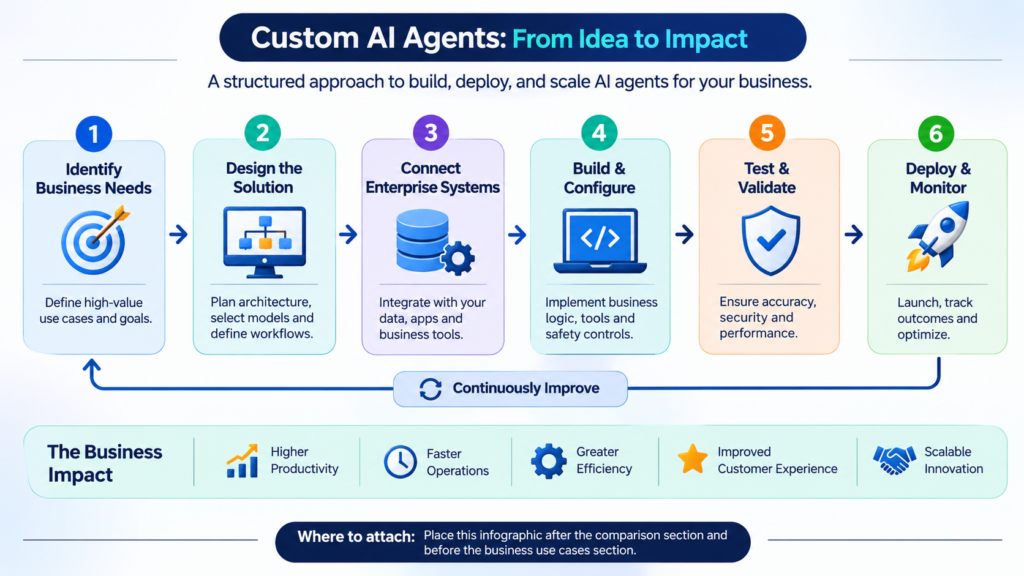
A typical development process includes:
Use-case discovery: Identify high-value workflows and define the tasks the agent should support.
AI architecture design: Select appropriate models, orchestration methods, tools, and knowledge sources.
Enterprise integration: Connect authorized systems, databases, APIs, and business applications.
Agent development: Configure instructions, business logic, workflow execution, and escalation paths.
Testing and evaluation: Validate accuracy, reliability, security, and performance against real business scenarios.
Deployment and monitoring: Track outcomes, manage costs, identify failures, and continuously improve the solution.
Organizations should also plan for common challenges such as inconsistent data, integration complexity, inaccurate outputs, excessive agent permissions, and unclear ownership.
This is where an experienced enterprise AI development partner can help translate business requirements into production-ready solutions.
Explore Custom AI Agent Opportunities for Your Enterprise
Why Choose Intellectyx for Custom AI Agent Development?
Intellectyx helps enterprises move beyond general-purpose AI assistance to develop AI solutions aligned with their specific business requirements.
Its enterprise AI capabilities include custom AI agent development, agentic AI solutions, enterprise knowledge AI, AI integration, and ongoing AI management.
Organizations can work with Intellectyx to:
Identify and prioritize high-value AI agent use cases.
Design custom agents around business processes and operational requirements.
Connect AI solutions with existing enterprise systems.
Develop orchestrated workflows for specialized business tasks.
Establish governance, monitoring, and evaluation processes.
Optimize deployed AI solutions as business requirements evolve.
Rather than treating AI agent development as an isolated technology project, the focus is on building solutions that integrate with enterprise operations and deliver measurable business outcomes.
Explore Intellectyx AI Agent Development Services to see how custom AI agents can support your organization’s automation and transformation goals.
Final Verdict: Microsoft Copilot or Custom AI Agents?
Microsoft Copilot and custom AI agents solve different problems, and the right choice depends on your organization’s objectives.
Copilot is a practical option for improving employee productivity within supported Microsoft applications. Custom AI agents are better suited to specialized workflows that require tailored business logic, deeper system integrations, and controlled task execution.
For enterprises pursuing broader AI transformation, combining both approaches can create a more connected AI environment: Copilot supports employees, while custom agents handle defined operational tasks.
The most important decision is not which technology is more advanced. It is which approach addresses your business challenges, fits your existing systems, and produces measurable results.
Planning your enterprise AI strategy? Connect with Intellectyx to explore custom AI agent development opportunities aligned with your business workflows.
FAQs
Microsoft Copilot helps employees complete everyday tasks, such as drafting documents, summarizing meetings, and analyzing information. Custom AI agents are designed for specific business workflows, allowing organizations to automate tasks, connect enterprise systems, and apply customized business logic.
Microsoft Copilot is an AI-powered assistant that includes different capabilities depending on the product. Some Copilot experiences also support AI agents. However, standard Copilot assistance and purpose-built custom AI agents serve different business requirements.
Custom AI agents can be better suited to specialized enterprise workflows involving multiple systems, business rules, and multi-step execution. Microsoft Copilot is useful for employee productivity and supported workplace tasks. The right choice depends on workflow complexity and business objectives.
Microsoft Copilot capabilities depend on the specific product, licensing, configuration, and available integrations. Organizations with specialized workflows, complex business logic, or requirements beyond supported capabilities may need extensions or custom AI agent development.
Yes. Custom AI agents can be connected with Microsoft Copilot experiences through supported Microsoft agent-building and integration capabilities. The available approach depends on the Copilot product, architecture, connectors, and security requirements.
Yes. You can build AI agents using Microsoft Copilot Studio and Agent Builder within Microsoft 365 Copilot. Agent Builder is suitable for creating lightweight agents using organizational knowledge, while Copilot Studio supports more advanced agents with custom integrations, business workflows, and broader deployment options. The right tool depends on your requirements, complexity, and governance needs.